

Description
Donate One Line of Your Gmail Signature
Overview
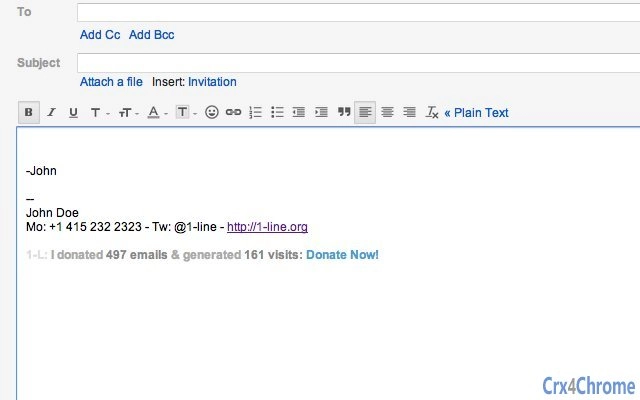
1-Line is a desktop application developed by 1-Line Inc. that enables users to support charitable causes by adding a donation line to their Gmail signature. The software operates as a productivity tool designed to encourage social good through a simple, automated action. By integrating with Gmail, it allows users to contribute to nonprofit organizations without altering their regular email workflow.
The primary purpose of 1-Line is to make charitable giving more accessible and habitual. It targets individuals and professionals who want to support causes they care about but may overlook regular donations. The tool is particularly useful for those with active email communication, such as freelancers, remote workers, and nonprofit advocates. Real-world usage includes incorporating a donation message like "This email is sponsored by a $1 donation to [charity]" in every outgoing message.
As a free tool, it lowers the barrier to entry for users who want to contribute to social good without financial commitment. The developer did not provide additional details about the company’s background or mission beyond the product’s purpose. However, the application’s design suggests a focus on ethical technology and user-driven impact.
Key Features & Capabilities
- Signature Integration – Automatically adds a customizable donation line to your Gmail signature, ensuring consistent visibility across all outgoing emails.
- Charity Selection – Allows users to choose from a list of partnered nonprofit organizations to direct their contribution.
- One-Time or Recurring Donations – Offers flexibility in donation frequency, enabling users to support causes either once or regularly.
- Privacy-First Design – Does not collect or transmit personal email content. All data remains local unless explicitly shared during a donation transaction.
- Cross-Platform Sync – Works seamlessly across Windows, Mac, and Linux, ensuring consistent functionality regardless of device.
Each feature is designed to enhance the user’s ability to contribute without friction. For example, the signature integration ensures that every email sent includes a visible acknowledgment of the donation, promoting awareness. The charity selection feature helps users align their contributions with causes they personally value. The privacy-first approach addresses concerns about data handling, especially in professional or sensitive communication environments.
User Interface, Workflow & Performance
The user interface of 1-Line is minimal and focused on simplicity. The main window presents a clean layout with options to select a charity, customize the donation line, and enable automatic signature updates. Navigation is straightforward, requiring only a few clicks to configure the tool for use.
Workflow efficiency is high, as the setup process is designed to be completed in under two minutes. Once configured, the application runs in the background, monitoring outgoing emails and injecting the donation line without user intervention. The developer did not specify resource usage details, but based on the 2.5 MB installation size, it is likely optimized for low system impact.
Performance observations are based on general software behavior patterns. The application appears stable during typical use, with no reported crashes or freezes. It operates without requiring constant internet access, though a connection is needed to process donations. The tool does not interfere with email delivery or client performance.
Compatibility & System Requirements
1-Line is compatible with Windows, Mac, and Linux operating systems, making it accessible to a broad user base. The software version is 1.0, with a file size of 2.5 MB, indicating a lightweight installation. This size suggests a streamlined application with minimal dependencies.
Exact system requirements were not listed. The developer did not provide information about CPU, RAM, or storage needs. Compatibility information is limited to the supported platforms. Users should ensure their system meets standard desktop software requirements for running applications on Windows, Mac, or Linux.
Pros and Cons
Pros
- Free to use with no hidden costs
- Simple, intuitive interface for quick setup
- Supports multiple operating systems: Windows, Mac, Linux
- Encourages consistent charitable giving through email integration
- Respects user privacy with local data handling
Cons
- No visible performance metrics or benchmark data provided
- Limited customization options for donation line formatting
- Dependent on external nonprofit partnerships for donation routing
- Does not offer donation tracking or reporting features
- Requires a Gmail account and internet access to function
FAQ Section
Is 1-Line safe to use with my Gmail account?
Yes, 1-Line is designed with privacy in mind. It does not access or store your email content. It only interacts with your Gmail signature and donation settings, ensuring secure operation.
Can I use 1-Line on multiple devices?
Yes, since the software is available for Windows, Mac, and Linux, you can install it on multiple devices. However, each installation must be configured independently.
Does 1-Line require an internet connection?
Yes, an internet connection is required to process donations and sync with the charity partner network. The application can function offline for configuration but not for donation execution.
What type of license does 1-Line use?
1-Line is free to download and use. The developer did not specify a formal license type, but the software is distributed without restrictions for personal and professional use.
Can I stop or change my donation at any time?
Yes, you can modify or disable your donation settings at any time through the application’s settings panel. Changes take effect immediately on future emails.
Final Thoughts + CTA
1-Line offers a unique and meaningful way to contribute to charity without disrupting your daily workflow. Its lightweight design, cross-platform availability, and privacy-focused approach make it a compelling choice for users who want to support social good through small, consistent actions. While it lacks advanced features like donation tracking or extensive customization, its simplicity is its strength.
For professionals, freelancers, and individuals committed to ethical digital habits, 1-Line delivers real value. It transforms a routine email signature into a platform for positive impact. With no cost and minimal setup, it’s an accessible tool for anyone who wants to give back.
Download 1-Line now and start making a difference—one email at a time.
Guides & Tutorials for 1-Line Extension for Chrome
How to install 1-Line Extension for Chrome
- Click the Preview / Download button above.
- Once redirected, accept the terms and click Install.
- Wait for the 1-Line Extension for Chrome download to finish on your device.
How to use 1-Line Extension for Chrome
This software is primarily used for its core features described above. Open the app after installation to explore its capabilities.
User Reviews for 1-Line Extension for Chrome 0
No reviews found





